Prometheus metrics for
self-hosted Qdrant

Per-collection vectors, shard health, search latency, cluster state — all the data Qdrant's native /metrics leaves out. One container. Zero config. Pre-built Grafana dashboard included.

Python 3.11+ Port :9153 27 metrics Prometheus Apache 2.0 Qdrant v1.7 – v1.17

What Qdrant's native /metrics doesn't expose

Qdrant's built-in endpoint gives you Go runtime stats and basic request counts. The rich per-collection data lives in /telemetry and /cluster — but is never surfaced as Prometheus metrics for self-hosted deployments. This exporter bridges that gap.

What you want to know
Native /metrics  →  This exporter
Vectors per collection
❌ missing → ✅ exposed
Shard status per collection
❌ missing → ✅ exposed
Optimizer state (live)
❌ missing → ✅ exposed
Search latency by type
❌ missing → ✅ exposed
Indexing completeness ratio
❌ missing → ✅ exposed
RAM / disk per collection
❌ missing → ✅ exposed
Shard transfer progress
❌ missing → ✅ exposed
Raft consensus health
❌ missing → ✅ exposed

Full metrics reference

All metrics are prefixed with qdrant_exporter_ to avoid collision with native qdrant_ metrics.

📦

Collections

11 metrics · sources: /collections, /telemetry

Per-collection and per-shard vector counts, storage bytes, health status, and optimizer state.

  • collection_vectors_total
  • collection_indexed_vectors_total
  • collection_points_total
  • collection_segments_total
  • collection_status {status}
  • collection_optimizer_status {status}
  • shard_vectors_total {shard_id}
  • shard_points_total {shard_id}
  • shard_vectors_bytes {shard_id}
  • shard_payloads_bytes {shard_id}
  • shard_state {shard_id, state}
🔗

Cluster

12 metrics · sources: /cluster

Node topology, Raft consensus health, shard distribution, transfer progress, and resharding state.

  • cluster_enabled
  • cluster_peers_total
  • cluster_raft_term
  • cluster_raft_commit
  • cluster_raft_pending_operations
  • cluster_is_leader
  • collection_shard_count
  • collection_local_shard_points
  • collection_local_shard_state
  • collection_remote_shard_state
  • collection_shard_transfers_active
  • collection_resharding_operations_active

Performance

11 metrics · source: /telemetry

Search latency by type, optimizer throughput, indexing ratio, and per-collection RAM/disk usage.

  • search_count_total {search_type}
  • search_fail_count_total {search_type}
  • search_avg_duration_micros {search_type}
  • optimizer_runs_total
  • optimizer_runs_failed_total
  • optimizer_avg_duration_micros
  • optimizer_active_total
  • collection_indexed_ratio
  • collection_deleted_vectors_total
  • collection_ram_bytes
  • collection_disk_bytes

Quick start

Three ways to run the exporter — pick whatever fits your setup.

Docker (single container)
Docker Compose + Grafana
Full stack
pip install
Point the exporter at your existing Qdrant
# Docker Hub
docker run -d \
  --name qdrant-exporter \
  -p 9153:9153 \
  -e QDRANT_EXPORTER_QDRANT__NODES='[{"url":"http://host.docker.internal:6333"}]' \
  --add-host host.docker.internal:host-gateway \
  baselhusam/qdrant-exporter

# GHCR
docker run -d \
  --name qdrant-exporter \
  -p 9153:9153 \
  -e QDRANT_EXPORTER_QDRANT__NODES='[{"url":"http://host.docker.internal:6333"}]' \
  --add-host host.docker.internal:host-gateway \
  ghcr.io/baselhusam/qdrant-exporter

Prometheus scrape target: http://<host>:9153/metrics — add to your existing Prometheus config.

docker-compose.yml — exporter + Prometheus + Grafana
services:
  qdrant-exporter:
    image: baselhusam/qdrant-exporter
    restart: unless-stopped
    ports: ["9153:9153"]
    environment:
      QDRANT_EXPORTER_QDRANT__NODES: '[{"url":"http://host.docker.internal:6333"}]'
    extra_hosts: ["host.docker.internal:host-gateway"]

  prometheus:
    image: prom/prometheus:latest
    restart: unless-stopped
    ports: ["9090:9090"]
    volumes:
      - ./deploy/prometheus.yml:/etc/prometheus/prometheus.yml:ro
    extra_hosts: ["host.docker.internal:host-gateway"]

  grafana:
    image: grafana/grafana:latest
    restart: unless-stopped
    ports: ["3000:3000"]
    environment:
      GF_SECURITY_ADMIN_USER: admin
      GF_SECURITY_ADMIN_PASSWORD: admin
    volumes:
      - ./deploy/grafana/provisioning:/etc/grafana/provisioning:ro
      - ./dashboards:/etc/grafana/provisioning/dashboards:ro

Open Grafana at http://localhost:3000 (admin / admin). Dashboard auto-provisioned.

Clone repo and run the full stack including Qdrant
git clone https://github.com/baselhusam/qdrant_exporter
cd qdrant_exporter

# Spin up Qdrant + exporter + Prometheus + Grafana
docker compose --profile fullstack up -d

# Or attach to an existing Qdrant on localhost:6333
docker compose --profile monitoring up -d
Grafana
localhost:3000
admin / admin
Prometheus
localhost:9090
Exporter
localhost:9153/metrics
Qdrant
localhost:6333
fullstack only
Install via pip and run directly
pip install qdrant-exporter

# Start with a config file
qdrant-exporter --config qdrant-exporter.yaml

# Or point at Qdrant via env var
QDRANT_EXPORTER_QDRANT__NODES='[{"url":"http://localhost:6333"}]' \
  qdrant-exporter

Requires Python 3.11+. Prometheus scrape target: http://localhost:9153/metrics

Config reference

Configure via YAML file or environment variables. All fields are optional — defaults work out of the box.

qdrant-exporter.yaml
qdrant:
  nodes:
    - url: http://localhost:6333
      api_key: your-key-here     # omit if no auth
  scrape_interval: 15            # seconds
  telemetry_details_level: 3     # required on Qdrant 1.16+

exporter:
  port: 9153
  log_level: info                # debug|info|warning|error
  metric_prefix: qdrant_exporter
Environment variables
# Prefix: QDRANT_EXPORTER_
# Nested delimiter: __

QDRANT_EXPORTER_QDRANT__NODES=\
  '[{"url":"http://localhost:6333",
     "api_key":"secret"}]'

QDRANT_EXPORTER_EXPORTER__PORT=9153
QDRANT_EXPORTER_EXPORTER__LOG_LEVEL=debug

Note on telemetry_details_level
Required for per-collection shard and storage metrics on Qdrant 1.16+. Defaults to 3. Override via QDRANT_EXPORTER_QDRANT__TELEMETRY_DETAILS_LEVEL if needed.

Architecture

The exporter is pull-based — it queries Qdrant on every Prometheus scrape, not on a timer.

┌─────────────┐ HTTP :6333 ┌──────────────────────┐ │ Qdrant │ ◄────────────────── │ qdrant-exporter │ │ │ /telemetry │ │ │ │ /cluster └──────────┬───────────┘ │ │ /collections │ :9153/metrics └─────────────┘ │ ┌────────▼──────────┐ │ Prometheus │ scrapes every 15s └────────┬──────────┘ │ PromQL ┌────────▼──────────┐ │ Grafana │ └───────────────────┘

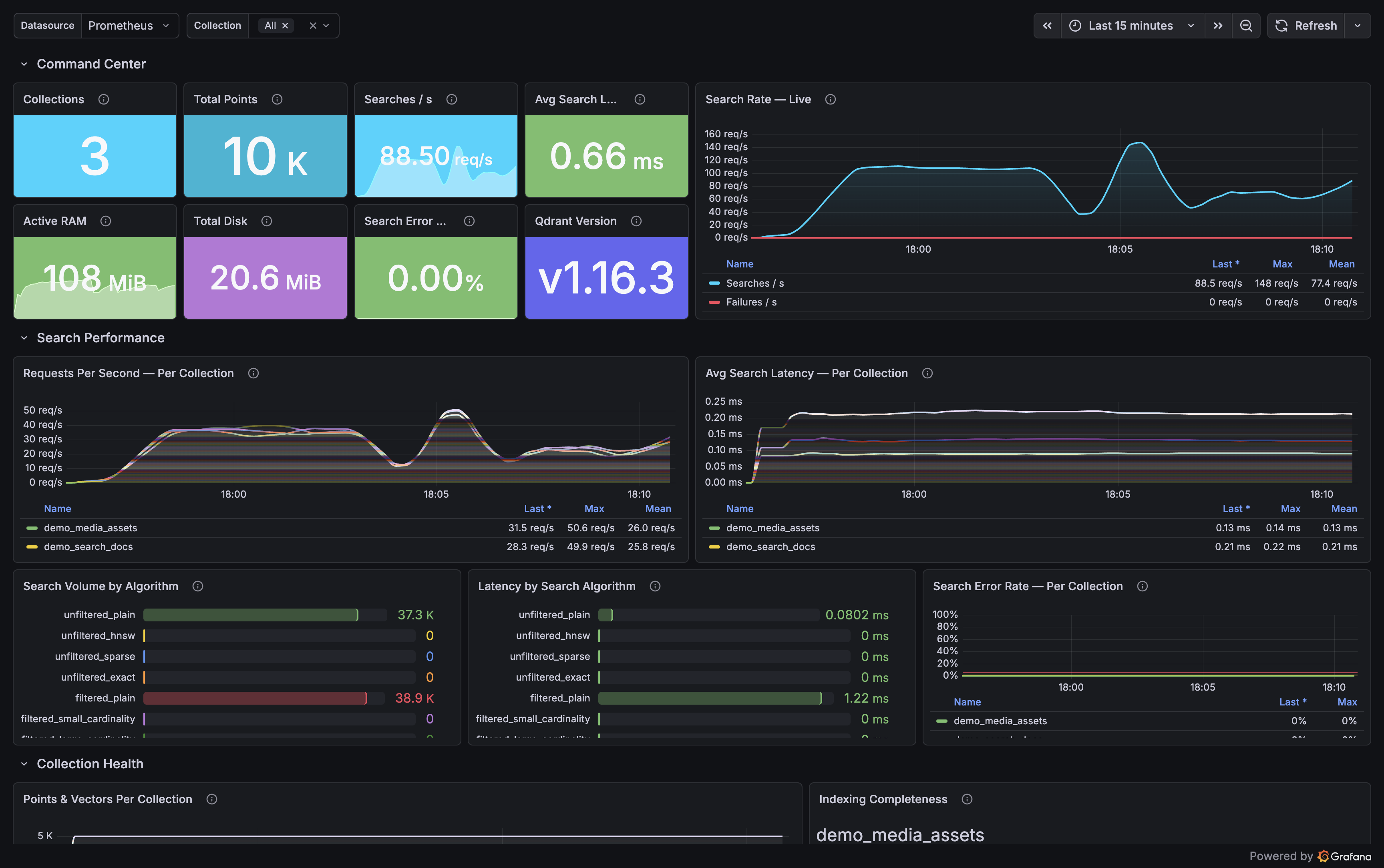
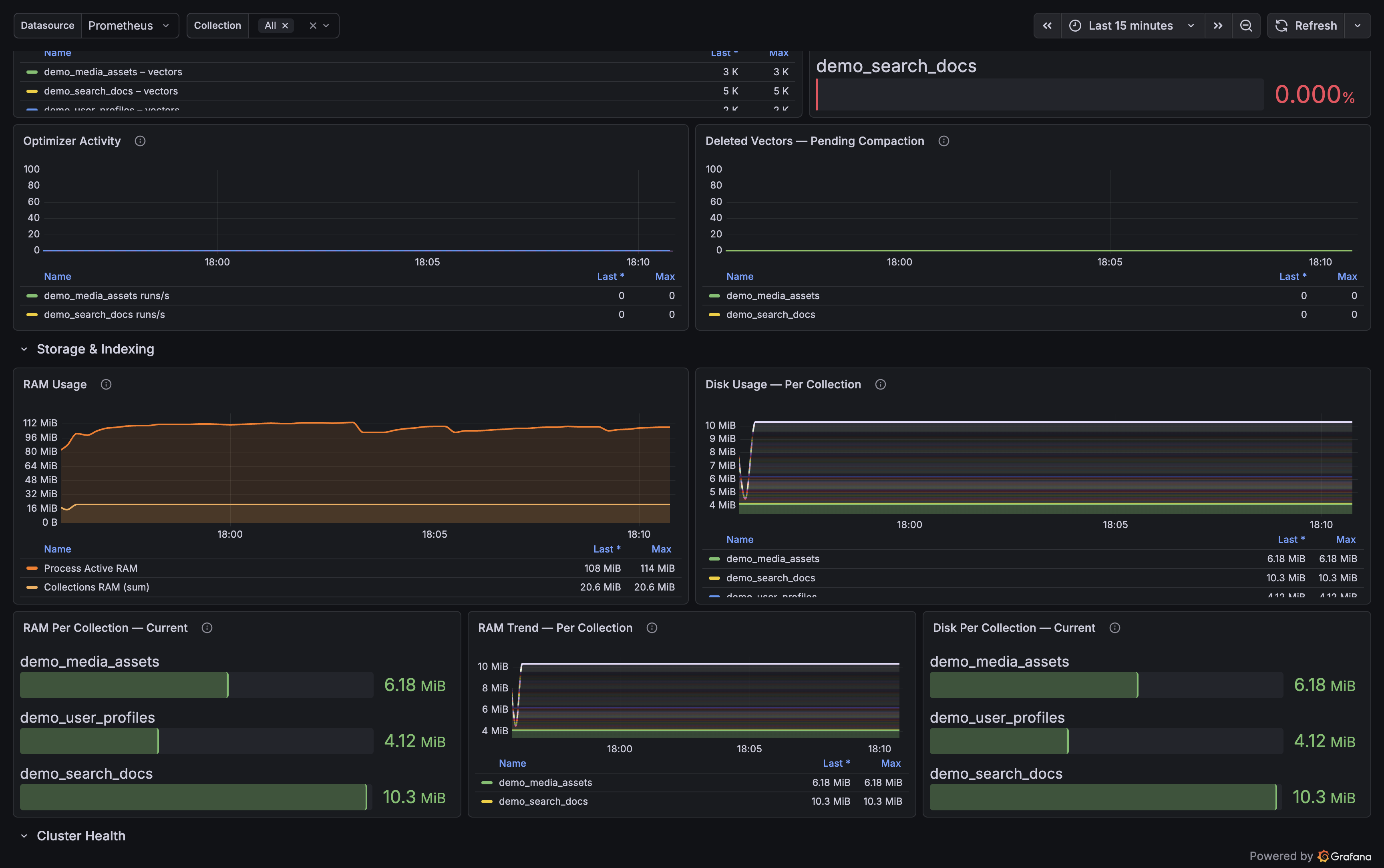
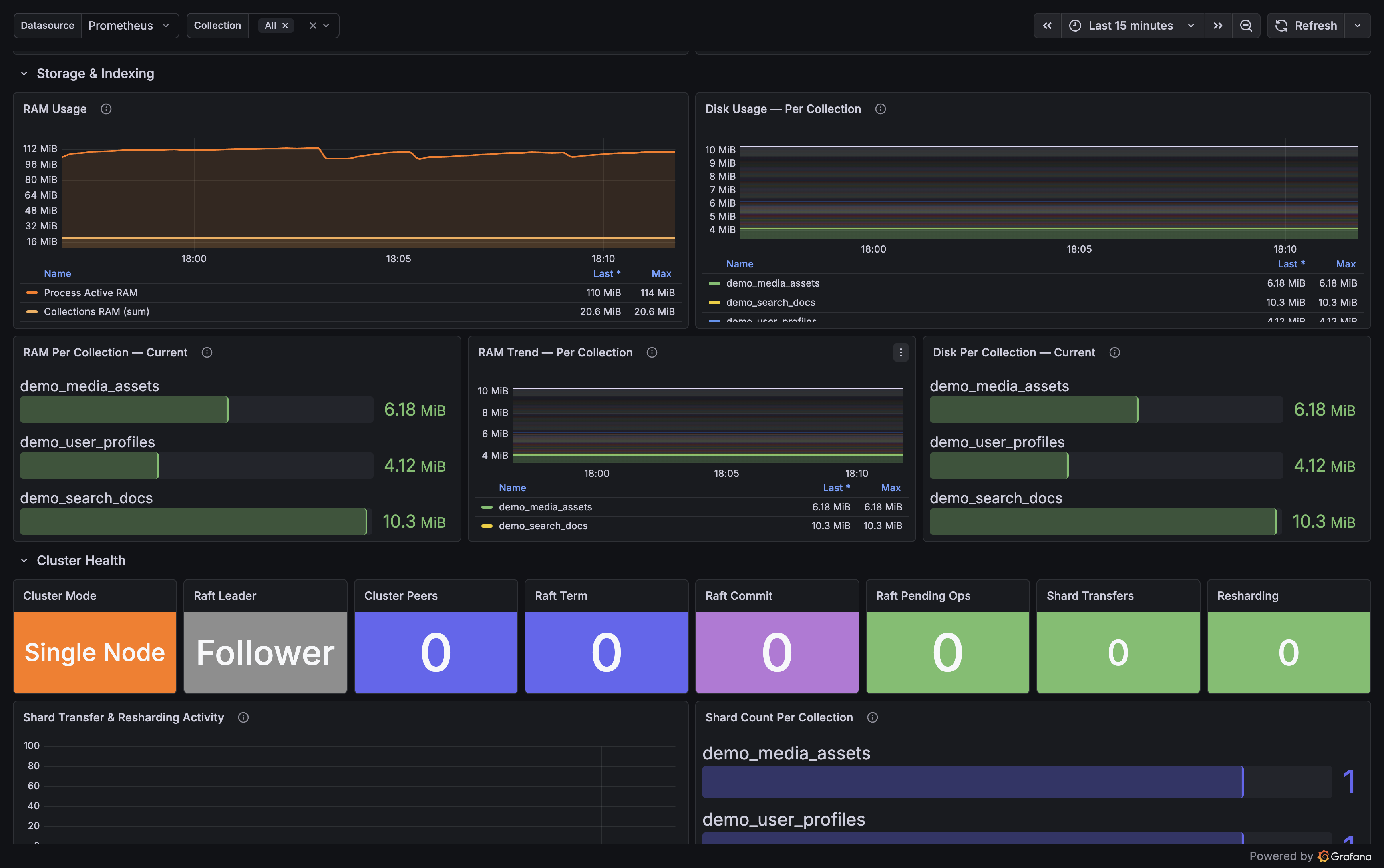
29 panels, 4 rows — auto-provisioned

Ships with a pre-built dashboard that auto-loads when you use the Docker Compose setup. Import manually from dashboards/qdrant-overview.json into any Grafana instance.

Overview
Total collections, vectors, points, Qdrant version, cluster mode, memory, per-collection health tiles
Search Performance
Search rate (req/s), avg latency by search type (ms), error rate, search count breakdown
Storage & Indexing
Indexing ratio gauge (alerts below 1.0), RAM and disk per collection, optimizer history, deleted vectors
Cluster
Cluster mode, Raft leader status, pending operations, peer count, shard transfer tracking
Qdrant Exporter Grafana dashboard — Overview row
Overview & collection health
Qdrant Exporter Grafana dashboard — Search performance
Search performance & latency
Qdrant Exporter Grafana dashboard — Storage and cluster
Storage, indexing & cluster health

Tested against Qdrant v1.7 – v1.17

The exporter performs a version check at startup and prints a compatibility assessment.

Qdrant version Startup behaviour
< 1.7.0 Red warning   Telemetry fields may be absent, metrics may be all-zero
1.7.0 – 1.12.x Yellow warning   Basic metrics work, some fields may be missing
1.13.0 – 1.17.1 Green   Fully tested range
> 1.17.1 Yellow notice   Exporter works but untested against this version